

tech
Gradio: the #1 interface for machine learning — one line between a model and the world
A model nobody can use is just a liability. Gradio is the interface layer that made machine learning usable: wrap any Python function in a browser UI with one line, from a single gr.Interface to full multi-page Blocks apps and ChatInterface LLM frontends — then share it with a public URL or deploy it to Hugging Face Spaces, the home of ML demos. Created by Abubakar Abid at Stanford and stewarded by Hugging Face, Gradio has become the default way the world touches AI. This is the complete tour.
AI-generated draft · reviewed and editedThis text was generated with AI as a first draft, then reviewed and edited by the author, who holds editorial responsibility for it.

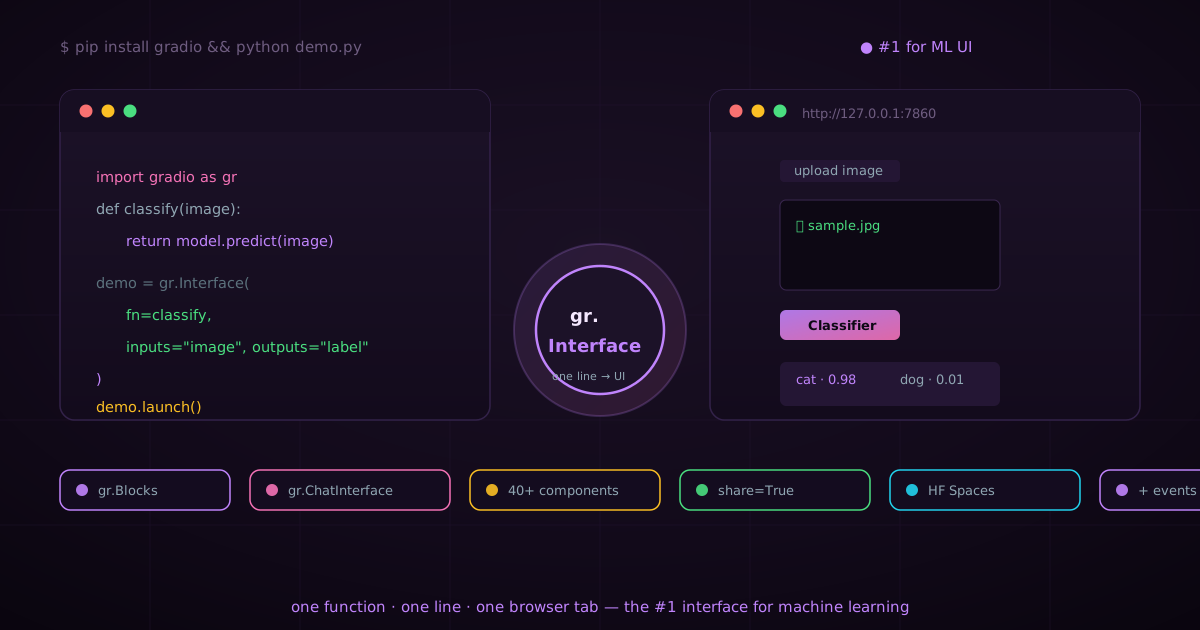
Gradio: the #1 interface for machine learning — one line between a model and the world
The machine learning community has a dirty secret: it is brilliant at building models and terrible at showing them to people. You train a classifier that can distinguish an EKG anomaly or a photorealistic generator that can draw a cat in the style of van Gogh — and then what? The model sits in a Jupyter notebook. Your colleague cannot use it because they do not have Python. Your stakeholder wants a link, not a lecture. Your model is excellent and, right now, completely useless to the world.
A machine learning model is only as valuable as the interface that lets a human use it. Gradio is that interface — and it has become the number one way the world touches AI. One Python function, one line, one browser tab. That is the entire magic.
This article is the complete tour of Gradio, the framework that turned ML demos from a ritual of pain into a two-minute task. We will cover its origin story, the three APIs that cover every use case (gr.Interface, gr.Blocks, gr.ChatInterface), the full component zoo, events and state, sharing links and Hugging Face Spaces, theming, deployment, and — with full honesty — where it beats every alternative and where it does not. By the end, you will understand why Gradio has become the default interface layer for machine learning, and you will be able to ship a usable ML app in the time it takes to read this section.
The origin story: a PhD project that became the default
Gradio was created in 2019 by Abubakar Abid during his PhD at Stanford University, and it was acquired by Hugging Face in December 2021 [3]. What began as a way to make his own machine learning research accessible became one of the most widely used tools for building and sharing ML demos in existence [3]. It is released under a permissive open-source license, which is a big part of why it spread so fast [3].
The timing was prescient. In 2019, the transformer wave was just beginning; by the mid-2020s, every serious ML project — image generation, speech synthesis, LLMs — needed a way to be experienced, not just evaluated. Gradio was standing exactly where that need appeared, and Hugging Face gave it a permanent home in the center of the open AI ecosystem. Today, when a model goes public on the Hugging Face Hub, it almost always ships with a Gradio demo attached [2].
Why interfaces are the real bottleneck in ML
Every ML team eventually hits the same wall: the hard part of deploying a model is rarely the model. It is the last mile — turning raw inference into something a human can point at and use. Without an interface, your stakeholders cannot evaluate your work, your users cannot adopt it, and your model is just a score on a leaderboard. The "demo gap" is the gap between "the model works" and "the organization uses it", and it is where most ML projects quietly die.
Before Gradio, closing that gap meant learning web development: React, Flask, WebSockets, deployment pipelines, and a lot of CSS. Gradio collapsed the whole stack into a single Python library. You describe inputs and outputs — an image in, a label out — and Gradio builds the browser UI, runs the inference, and renders the result. No JavaScript. No frontend. No DevOps ceremony.
The three APIs that cover everything
Gradio is not one tool but three, layered so you can start at the simplest level and grow without rewriting:
gr.Interface— the fastest path from Python function to web app. One wrapper class, one line, done. Perfect for demos, evaluations, and single-purpose tools.gr.Blocks— a layout engine for everything more complex. Build multi-component, multi-step apps with custom layouts, tabs, and event wiring. This is where Gradio becomes a real application framework.gr.ChatInterface— a specialized class for conversational applications. Give it a function that takes a message and returns a response; Gradio gives you a ChatGPT-grade chat window with history, streaming, and retries for free [2].
The design philosophy is deliberate: the 80% case (a model in, a result out) should cost one line, and the 20% case (rich multi-step UIs) should be genuinely supported rather than bolted on. That is why the same library powers both a 10-line image classifier demo and production internal tools with dozens of components.
gr.Interface: three lines to your first ML app
Installation is one command, and the first app is three lines of code:
pip install gradioimport gradio as gr
def greet(name):
return f"Hello, {name}!"
demo = gr.Interface(fn=greet, inputs="text", outputs="text")
demo.launch()Run it and a browser opens at http://127.0.0.1:7860 with a working text-input/text-output app. The gr.Interface class infers the component type from the string shorthand ("text", "image", "audio"); you can also pass explicit component instances when you want params like labels and defaults. This is the entire onboarding — if you can write a Python function, you can ship an ML app in under a minute.
A slightly more realistic example — an image classifier that takes an image and returns a top-3 prediction — is barely longer:
import gradio as gr

def classify(image):
    # model.predict(image) -> ["cat", "dog", "bird"]
    return top3(image)

demo = gr.Interface(
    fn=classify,
    inputs=gr.Image(type="pil"),
    outputs=gr.Label(num_top_classes=3),
    title="Animal Classifier",
    description="Upload a photo and see the top-3 predictions.",
)
demo.launch()
Note what Gradio handled for you: the image upload widget, the file decoding into a PIL image on the server side, the label output with confidence bars, the title and description, and the launch server. You never touched HTML, CSS, or JavaScript [2].
The component zoo: 40+ ways to move data in and out
Gradio ships over 40 component types designed for the full spectrum of ML data [2]. This is one of the things that makes it categorically different from generic web frameworks — the components are the data types of machine learning:
- Text:
gr.Textbox(single- or multi-line),gr.Dropdown,gr.Radio,gr.CheckboxGroup,gr.Number,gr.Slider— every form primitive you need for hyperparameters and prompts. - Image:
gr.Image(upload, webcam capture, or canvas — the canvas is a doodle pad, perfect for sketch-based models),gr.Gallery(grid of output images — the workhorse of image generation demos),gr.AnnotatedImage(segmentation overlays). - Audio:
gr.Audio(record from mic, upload, or play back — two-way),gr.AudioWaveformfor waveforms with editable regions,gr.Microphone— the backbone of speech-to-text and TTS demos. - Video:
gr.Video(upload and playback), useful for action recognition and generation demos. - Data:
gr.Dataframe(interactive editable tables — the bridge between ML and analytics),gr.JSON(structured outputs — vital for LLM tool calls and API-style results),gr.File(arbitrary uploads),gr.Model3D(view and rotate 3D meshes — the go-to for NeRFs and depth models) [2]. - Media generation:
gr.ImageEditor(combined upload, canvas, and mask layers — the native interface for inpainting and image editing models),gr.Code(language-aware code editor for code-generation demos),gr.HTMLandgr.Markdown(rich text and custom markup),gr.Plot(Matplotlib/Bokeh/Plotly figures),gr.HighlightedText(NER-style token highlighting),gr.Chatbot(the chat bubble component at the heart of every LLM interface).
The practical consequence: whatever your model consumes or produces — pixels, sound waves, meshes, tables, chat turns — there is a first-class component for it, and it just works. You never fight a generic widget to make it accept an audio file or render a segmentation mask.
gr.Blocks: when one function is not enough
Not every app is a single function. Image-editing pipelines chain a generation step and a refinement step. Internal tools combine upload, preview, and export. Model comparison apps show two outputs side by side. For everything beyond the one-function demo, Gradio gives you gr.Blocks — a layout engine that lets you compose components into arbitrary arrangements and wire them with events [2].
import gradio as gr

with gr.Blocks() as demo:
    with gr.Row():
        with gr.Column():
            prompt = gr.Textbox(label="Prompt")
            btn = gr.Button("Generate")
        with gr.Column():
            output = gr.Image(label="Result")

    btn.click(generate, inputs=prompt, outputs=output)

demo.launch()
The with blocks define layout: gr.Row(), gr.Column(), gr.Tab(), gr.Accordion(), and gr.Group() compose the page, and event methods (.click(), .change(), .submit()) wire inputs to outputs through your Python functions. The mental model is "layout as context, events as wiring" — and it is remarkably compact for the power it gives you.
Events: the full interactivity model
Gradio events come in a rich vocabulary that covers every interaction pattern:
.click()— on button click (the workhorse)..change()— when a component value changes (typing, selecting, uploading)..input()— fires as the user types, live..submit()— form-style submit (thinkEnterin a textbox)..select()— when the user selects an item (e.g. a row in a dataframe, an image in a gallery)..upload()— when a file is uploaded..play() / .pause() / .stop()— media control events on audio/video players.gr.on()— a lower-level API for multiple triggers.
Events can also be chained into multi-step flows: the output of one event can feed the input of another component, enabling pipelines that run several functions in sequence with visible state changes. Combined with streaming outputs (stream=True), this is what powers live chat responses that appear token by token [2].
State and queues: making apps feel real
Two mechanisms turn Gradio from a demo toy into an application platform. State lets you persist data per session — pass a gr.State object into your function and Gradio serializes it and returns it to the same session on every call. This is how multi-turn conversations remember context, how a wizard remembers earlier steps, and how an editor tracks the working document. State is scoped per browser session, so user sessions are fully isolated from one another.
And demo.queue() adds the built-in queue of Gradio: requests are processed in order with a progress display, which is essential when inference is slow or GPUs are shared. queue(default_concurrency_limit=N) controls how many jobs run in parallel — the lever you pull when a model must not be hit by ten simultaneous generations.
Sharing: from localhost to the world in one flag
Every demo is shareable by default. demo.launch(share=True) creates a temporary public URL via the share tunnel provided by Gradio that routes through their servers to your machine — no deployment, no domain, no firewall config. You paste the link in a chat and your model is being poked by someone on the other side of the planet. This is the fastest sharing loop in machine learning, and it is the reason "can you demo it?" stopped being a scary question.
For permanent hosting, the answer is Hugging Face Spaces. A Space is a Git repository that Gradio (or Streamlit, or a Dockerfile) runs as a hosted app — you git push and huggingface.co/some-model-demo is live with HTTPS, resource scaling, and an embeddable widget. The integration is first-party and seamless: Gradio was built with Spaces in mind, and Spaces is where the overwhelming majority of public ML demos live [2].
Theming: from default gray to your brand in minutes
Gradio apps used to look like Gradio apps — functional, clean, and unmistakable. Gradio 4+ changed that with gr.themes: you can use a preset theme (gr.themes.Soft(), gr.themes.Monochrome(), gr.themes.Base()), or build a custom one by subclassing and overriding design tokens — primary hue, background, font, radii, spacing. The theming API is token-based, so you can restyle an entire app with a few lines:
import gradio as gr

my_theme = gr.themes.Base()\
    .set(primary_hue="orange")

with gr.Blocks(theme=my_theme) as demo:
    ...
You can even override theme tokens per-component with the elem_id and custom CSS parameters. For a demo meant to impress stakeholders, two minutes of theming turns a stock app into something that looks designed.
The case for #1: Gradio vs. Streamlit vs. Dash
Gradio is not the only Python-to-web tool, and it would be dishonest to claim otherwise. But for the specific job of putting machine learning models in front of humans, it is the best tool in existence — and here is the honest reasoning, point by point:
Gradio vs. Streamlit
Streamlit is a superb general-purpose data app framework: it excels at dashboards, data exploration, and internal analytics tools — if your primary output is tables and charts, Streamlit is genuinely strong. But for ML interfaces specifically, the Gradio components are the ML data types: gr.ImageEditor with built-in masking, gr.Audio with in-browser recording, gr.Model3D, gallery grids, and a chatbot component purpose-built for LLMs. In Streamlit you assemble a model demo from generic widgets; in Gradio you assemble it from the widgets your model actually needs. Gradio also has the deeper machine learning pedigree — the ecosystem around Hugging Face Spaces is effectively built on it, which is why the "demo a model" convention is push to a Space, not "stand up a Streamlit cloud app" [2]. For pure data dashboards, take Streamlit; for ML interfaces, Gradio wins.
Gradio vs. Dash
Dash (by Plotly) is the enterprise heavy-lifter: callback graphs, production-grade enterprise dashboards, and commercial support. It is a serious tool for serious analytics products. But it demands far more boilerplate, and it is not oriented toward ML data — a Dash app that streams audio or edits images is a project, not a weekend. For enterprise analytics at scale, Dash has its place; for the ML interface layer, the Gradio component model and Spaces integration are simply more direct.
The number-one verdict
- Fastest time-to-demo: a working ML interface in under a minute beats anything in the ecosystem.
- ML-native components: 40+ typed components designed for ML data — no other framework comes close [2].
- Deepest ecosystem integration: first-class Hugging Face Spaces hosting, share links, and the model-hub convention [2].
- Specialized LLM layer:
gr.ChatInterfacegives you a production chat UI for free — the defining interface of the current AI era. - Proven at scale: the default interface of the open AI platform, used by millions of demo visitors [3].
When Gradio is not the right choice (honesty section)
Gradio is not a substitute for a product team. If you are building a full SaaS product with complex authenticated workflows, billing, and a bespoke design system, you probably want a real frontend framework — React, a proper design system, and an API layer. Gradio will happily power your internal prototype and your model demo, but it will not replace your marketing site or your customer account flows.
Similarly, if your core need is interactive data analytics with deep dashboarding — correlated charts, drill-downs, pivot tables — Streamlit or Dash will serve you better. The Gradio analytical components (dataframe, plot) are good but not its center of gravity. And for very high-concurrency production endpoints serving millions of API calls, you will still want a purpose-built serving layer (Triton, vLLM, a FastAPI service) — with Gradio as the human-facing front end on top. The honest summary: Gradio is the #1 interface layer for machine learning, and it is not a general web framework.
Deployment paths: from prototype to production
- Local demo:
demo.launch()— localhost at :7860. - Instant share:
demo.launch(share=True)— temporary public link through the Gradio tunnel. Perfect for a stakeholder review. - Hugging Face Spaces: — permanent hosting with HTTPS, free CPU tier, and GPU upgrades. The canonical ML demo home [2].
- Docker / self-hosted: — package your app in a container and deploy to any cloud (AWS, GCP, Azure, your own rack). Gradio serves a standard HTTP app, so reverse proxies and load balancers just work.
- Gradio endpoints: — every app exposes an HTTP API automatically, so you can call your demo programmatically — a free bonus API layer for scripts and integrations.
Best practices for production Gradio apps
- Enable the queue:
demo.queue()— it serializes heavy inference, shows progress, and prevents GPU thrashing under load. - Use typed components: pass explicit
gr.Image(type="pil")rather than string shorthand, so your function gets predictable inputs. - Keep inference in a function: separate model loading (once, at import time) from per-request inference (inside the event handler).
- Stream long outputs: for LLMs and generation, use
stream=Trueorgeneratorfunctions so users see output as it is produced, not after the wait. - Capture state explicitly: use
gr.Statefor anything that must survive across turns, and keep it scoped to the session. - Set limits:
max_file_sizeon uploads and reasonable defaults on sliders to keep the demo robust against misuse. - Theme it: two minutes on
gr.themesdoubles perceived quality — a branded demo reads as a product, not an experiment.
The API cheat sheet
import gradio as gr

# 1. The one-function demo
interface = gr.Interface(fn=predict, inputs="image", outputs="label")

# 2. Custom layout with events
with gr.Blocks(theme=gr.themes.Soft()) as demo:
    with gr.Row():
        inp = gr.Textbox(label="Prompt")
        btn = gr.Button("Run")
    out = gr.Image(label="Output")
    btn.click(fn, inputs=inp, outputs=out)

# 3. Chat interface (LLMs)
chat = gr.ChatInterface(fn=respond, type="messages")

# 4. State + queue
with gr.Blocks() as demo:
    counter = gr.State(0)
    ...  # pass counter in/out to persist

demo.queue().launch(share=True)
The bottom line
A model is not finished until a human can use it. Gradio is the fastest, most complete, best-supported way to make that happen — and that is why it is the number one interface layer for machine learning.
Start with gr.Interface and ship a demo in minutes. Grow into gr.Blocks for real applications, and gr.ChatInterface for the LLM era. Share it with one flag, host it forever on Spaces, and give your model the interface it deserves. Born at Stanford in 2019, stewarded by Hugging Face since 2021, and now the default way the world touches AI [3] — Gradio is the layer that turned machine learning from something you read about into something you click.
Sources
- Gradio official documentation: https://gradio.app/
- Gradio changelog (Gradio 5 era): https://gradio.app/changelog
- Introduction to Gradio for Building Interactive Applications (PyImageSearch): https://pyimagesearch.com/2025/02/03/introduction-to-gradio-for-building-interactive-applications/
- Gradio history and acquisition (AI Wiki): https://aiwiki.ai/wiki/gradio (created 2019 by Abubakar Abid at Stanford; acquired by Hugging Face in December 2021)
- Gradio GitHub repository: https://github.com/gradio-app/gradio
- Hugging Face Spaces (Gradio hosting): https://huggingface.co/spaces
- Hugging Face acquires Gradio (Hacker News thread): https://news.ycombinator.com/item?id=29581619
keep reading
n8n runs half the internet’s automations. Just don’t call it open source.
Two camps rule agent building — hand everything to the model, or route every path by hand. n8n owns the middle: a fair-code canvas with 2,273 integrations, LangChain-powered agents, per-execution pricing, and a production ops story most coverage skips. Everything numeric here traces to a primary source.
tech · 15 min · 2026-09-27
Streamlit: the fastest path from a Python script to a live data app
Streamlit turns plain Python scripts into interactive web apps without writing a single line of HTML, CSS, or JavaScript. Here is an exhaustive tour: how its rerun architecture works, every widget type, caching and session state, multi-page apps, custom components, theming, deployment, security, and how it compares to Dash, Gradio, and Panel.
tech · 18 min · 2026-09-13
Local AI is just a file and a program. Here is how to run it yourself
Running AI locally sounds like it needs a PhD and a $10,000 computer. It does not. Local AI is a model file on your disk and a program that runs it — no cloud, no API keys, no subscription. Here are the real building blocks and the four ways to run a model on your own machine, from a clickable app to pure code.
tech · 14 min · 2026-09-08