
ai
Open WebUI: the self-hosted AI command center every organization needs
Your teams are already using AI — a dozen SaaS subscriptions, data leaking at every boundary, and zero governance. Open WebUI is the antidote: one self-hosted, provider-agnostic command center that connects local Ollama models and cloud APIs, wraps them in SSO, RBAC, audit logging and RAG, and runs entirely inside your own perimeter. Here is why organizations from Samsung Semiconductor to Astellas Pharma are deploying it — and how you can be running it tonight.
AI-generated draft · reviewed and editedThis text was generated with AI as a first draft, then reviewed and edited by the author, who holds editorial responsibility for it.

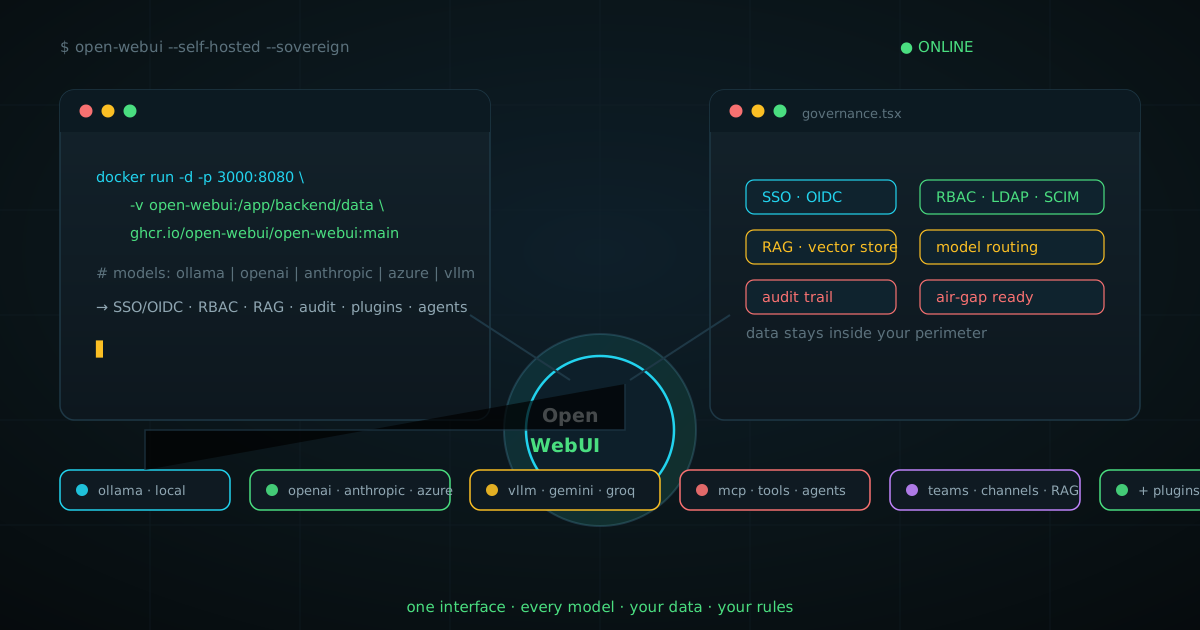
Open WebUI: the self-hosted AI command center every organization needs
Walk through any modern organization and you will find the same quiet chaos: engineering has three ChatGPT seats and a Claude subscription, marketing pays for Gemini, support bought a Copilot license nobody tracks, and someone in legal is using a free chatbot with customer data. Every team adopted AI individually, which means the organization as a whole has no AI strategy at all — just a pile of invoices, a patchwork of shadow AI, and data crossing the perimeter a dozen different ways. There is a better way, and it is called Open WebUI.
Open WebUI is a home for AI — a self-hosted AI platform that is extensible, feature-rich, user-friendly, and built to run entirely offline. With support for Ollama and OpenAI-compatible APIs, it gives you a powerful, provider-agnostic interface for both local and cloud-based models.
This article makes the case that Open WebUI is the single most effective piece of infrastructure an organization can deploy to get AI under control: one interface, every model, your data, your governance. We will look at the problems it solves, the features that matter for teams, how real organizations are using it, what the architecture looks like at scale, and exactly how to be running it tonight.
The problem: your organization is already using AI — badly
Nobody decides to lose control of AI. It just happens, one viral tool at a time. A developer needs a quick answer, a manager needs a summary, and suddenly the company is paying four overlapping subscriptions and none of them talk to each other. By the time it is visible on a budget report, the pattern is already entrenched. The damage is real and it stacks in four directions:
- Shadow AI. When there is no official AI surface, employees invent one. That is untracked spend, untracked usage, and an attack surface you never approved.
- Data leakage. Every prompt sent to a hosted chatbot leaves your perimeter. Contracts, source code, customer records — nobody audits any of it, because nobody can.
- Vendor lock-in. A frontier model vendor can change pricing, deprecate models, or impose new data terms. If your entire operation is hard-wired to one API, your leverage is zero.
- No shared memory. Every team starts from zero. The answer marketing found last quarter is invisible to support, and the knowledge quietly evaporates when employees leave.
The fix is not banning AI — that just drives it underground. The fix is giving the organization one official, governed, self-hosted front door for AI. That front door is what Open WebUI is.
What Open WebUI actually is
Open WebUI is an open-source, self-hosted web interface for large language models — one Docker container that turns any collection of models into a ChatGPT-class platform for your whole organization. It runs on your own hardware or cloud, entirely inside your own perimeter, and can operate fully offline with local models via Ollama.
The key architectural word is provider-agnostic. Open WebUI does not care where your intelligence comes from. One instance can mix, match, and route across:
- Local models via Ollama, llama.cpp, vLLM, LM Studio — your own GPUs, your own weights, zero egress.
- Cloud APIs OpenAI, Anthropic, Azure OpenAI, Google Gemini, Mistral, Groq, OpenRouter — any OpenAI-compatible endpoint, many configurable from one admin panel.
- Anything else Compatibility with the OpenAI spec means new providers plug in without custom code — and custom connectors exist for everything else.
That one property — an interface that outlives any single model vendor — is the strategic basis for everything else in this article. Open WebUI is the control plane; the models underneath are interchangeable compute.
One line to install
The fastest path to a running, multi-user AI platform is a single Docker command:
docker run -d -p 3000:8080 \
  --add-host=host.docker.internal:host-gateway \
  -v open-webui:/app/backend/data \
  -e WEBUI_SECRET_KEY=your-secret-key \
  --name open-webui --restart always \
  ghcr.io/open-webui/open-webui:main
Then open http://localhost:3000 and create the first (admin) account. The same project also ships as a Python package (pip install open-webui), a uvx one-liner, a native desktop app, and Helm charts for Kubernetes. The install is the easy part — the features are what take weeks of engineering in any other stack.
Why organizations choose it: the feature layer
A pretty chat UI is table stakes. What turns Open WebUI into organizational infrastructure is the governance and collaboration layer that sits around it. These are the features that matter when you move from “a tool for me” to “the AI platform for 500 people”:
Identity and access: SSO, RBAC, and provisioning
Open WebUI plugs straight into your existing identity stack — OAuth 2.0 and OIDC single sign-on, LDAP, and SCIM provisioning — so users arrive with their corporate accounts and roles. Admins get role-based access control, API key management, per-model access rules, and the ability to hide or group models. Switching the whole company onto it does not mean managing another user database; it means inheriting the one you already run.
RAG: your documents become the AI’s context
Built-in retrieval-augmented generation turns uploaded documents into answers grounded in your data. PDFs, DOCX, Markdown, CSVs — drop them in, and retrieval embeds them into a configurable vector backend (Chroma, Qdrant, pgvector, and more). At chat time, Open WebUI embeds the query, searches the vector store, and feeds the top matches into the prompt. Notably, no copy of the documents is stored in Open WebUI itself — the embeddings and references are what live in the index, which keeps the data footprint clean from a privacy standpoint.
Organizations use this to put policies, product docs, and internal wikis into every conversation. The result is an assistant that answers from your source of truth instead of the open internet — and with hybrid search and re-ranking options, retrieval quality is tunable to production standards.
Extensibility: functions, tools, pipelines, MCP
This is where Open WebUI stops being a chat app and becomes a platform. A first-class plugin system lets you extend it with Python:
Functions— Pipes (custom “models” with bespoke prompts and logic), Filters (inspect and transform every message in flight), and Actions — all running in-process, no extra worker.Tools— give models real capabilities: web search, database queries, internal API calls, anything with an HTTP endpoint.MCP and OpenAPI— connect any Model Context Protocol server or OpenAPI tool server, reusing the growing MCP ecosystem without custom glue code.Community plugins— a thriving library of shared plugins, tools, and functions (audit with care: plugins run as code).
Agents that do things: Open Terminal and beyond
Modern AI infrastructure needs to do more than answer questions. Open WebUI’s Open Terminal turns it into a full agent harness with a real action runtime — sandboxed files, shell access, code execution, previews, and artifacts. And the ecosystem extends it in the direction of real machines: Open WebUI Computer is a companion runtime where agents work on actual files, branches, and services on hardware you own.
Collaboration and workspace
Knowledge compounds when it is shared. Open WebUI includes shared prompts, a workspace for notes and custom model definitions, and channels for team conversations — so the prompt that legal perfected or the model marketing tuned is reusable by everyone, instead of living in one person’s browser tab.
The sovereignty argument: why self-hosting wins for organizations
Everything above — RAG, collaboration, model routing — exists in commercial SaaS products. The decisive difference is where the platform runs and who controls it. Open WebUI was designed from the ground up for sovereign AI: the legal and technical posture of deciding exactly where data resides and which models are exposed. The license even formalizes this — the project’s standard license is explicitly built as the framework for organizations maintaining a Sovereign AI position.
- Data stays home. On-premise or private cloud, prompts and documents never leave your network. Air-gapped deployments are supported for the strictest environments.
- No lock-in, ever. Swap a model provider in an afternoon. The interface, the RAG index, the user base, and the audit trail all stay exactly where they are.
- Cost control. Route routine work to cheap local models and reserve paid frontier APIs for the tasks that need them. One platform, mixed economics.
- Compliance-ready. For organizations operating under GDPR or the EU AI Act, a self-hosted platform with clear data boundaries and audit capability is a fundamentally different conversation than “the prompts go to a data center in another jurisdiction”.
Proof: how real organizations are using it
Open WebUI is one of the fastest-growing AI platforms in the world, and the enterprise customer stories are not hand-wavy marketing — they are measurable outcomes:
- Samsung Semiconductor built a secure, self-hosted AI platform where teams report complex workflows shrinking from days to hours — while meeting strict data-security requirements.
- Public Storage reached roughly 50% active adoption within 30 days via a champion-driven rollout on GCP, and cut a key operational workflow by more than 80%.
- Astellas Pharma enabled 3,000+ employees to create and share 420+ custom AI models on a secure Azure deployment — with 68% reporting significant efficiency gains and a +43 NPS.
- Johannes Gutenberg University Mainz serves 30,000+ students and 5,000+ employees from a fully open-source stack — LLMs, proxy/load balancer, and Open WebUI as the frontend.
The pattern in every story is identical: a secure, self-hosted surface, rapid adoption because the UX is genuinely pleasant, and compounding returns as teams share models and knowledge. Adoption is not a training problem when the tool is good enough to spread itself.
Architecture at scale: stateless by design
Enterprise deployment does not mean a bigger container; it means a cluster. Open WebUI is stateless by design: application replicas are interchangeable, with shared databases and storage holding state and Redis coordinating sessions and real-time events. When demand grows, you add replicas behind a load balancer — horizontal scaling without re-architecture. Redis-backed session handling keeps WebSocket connections coherent across replicas, and the storage layer (SQL database plus vector store) is pluggable so it slots into existing operational tooling.
That stateless, horizontally scalable spine is what lets an organization start with one Docker container on a Friday and grow, without ever rewriting the platform, to a load-balanced multi-node deployment serving thousands of daily users.
The license: free where it matters, clear where it gets real
Open WebUI’s dual-track licensing is refreshingly honest:
- Standard use is free. Internal use with the original Open WebUI branding intact — which covers the vast majority of organizations, and is exactly what the customer stories above run.
- Enterprise use is licensed. White-labeling, rebranding, or enterprise-exclusive offerings (like the Terminals orchestrator) require an enterprise license that includes support, SLAs, and direct access to the core engineering team.
For most organizations the calculus is simple: you get a complete AI platform for the cost of a server, while the project stays sustainable through enterprise licenses for the minority that needs white-label or premium support.
Open WebUI vs. the alternatives
- vs. ChatGPT Enterprise / closed SaaS: you are renting a UI and a model together, your data flows through their pipes, and there is no way to plug in your own models or your own storage. Open WebUI gives the same class of UX on your infrastructure, with your identity, and any model you choose.
- vs. building your own chat frontend: a custom interface means months of engineering for a fraction of the features — RAG, RBAC, SSO, tool calling, model routing, and the plugin ecosystem are already built, tested, and community-hardened.
- vs. plain Ollama: Ollama is excellent model serving; Open WebUI is the multi-user platform on top. They are complementary — Open WebUI connects to Ollama as a first-class provider.
When it is not the right choice (honesty section)
Open WebUI is not magic, and picking it should be a decision, not a reflex. If your organization has no infrastructure team and no appetite for running anything, a managed SaaS product will be easier — you trade sovereignty for convenience, and that is a legitimate trade. If you need enterprise-grade white-labeling or guaranteed SLAs at planetary scale, factor in the enterprise license. And self-hosting means you own operations: updates, backups, and the Proxmox/Kubernetes plumbing underneath. The platform removes the AI-layer complexity; it does not remove the infrastructure layer entirely.
But if your organization has a server, a directory service, and a serious interest in keeping its data — the bar for choosing Open WebUI is astonishingly low, and the payoff is disproportionately large.
The bottom line: give your organization its own AI command center
The organizations that run their own AI layer keep their data, their models, and their leverage. The ones that rent it get none of the three.
Open WebUI is the fastest, most complete path from “everyone uses their own AI” to “the organization has one AI platform, on its own terms”. One Docker command tonight; SSO, RAG, model routing, and a shared workspace by next week; a horizontally scalable sovereign AI platform by next quarter. The cost of inaction is compounding quietly in the shadow-AI subscriptions nobody audits — and the cost of action is one container.
Sources
- Open WebUI official docs — Home: https://docs.openwebui.com/
- Open WebUI for Enterprise: https://docs.openwebui.com/enterprise/
- Open WebUI GitHub repository: https://github.com/open-webui/open-webui
- RAG and document processing docs: https://docs.openwebui.com/features/chat-conversations/rag/
- Pipelines plugin framework: https://docs.openwebui.com/features/extensibility/pipelines/
- Enterprise features overview (DeepWiki): https://deepwiki.com/open-webui/docs/6-enterprise-features
- Open WebUI project site: https://openwebui.com/
keep reading

The Model That Would Not Speak: System One AI on Your Own Machine
One support ticket, three decision models, no graphics card: I ran 144M, 421M and 4.2B System One models on my own CPU and wrote down what each one said. The 144M model missed "I am cancelling on Friday"; the vague ticket produced three different answers. What a decision model is, how to run one with llama.cpp or Ollama, and how Kev, Nimble, Laya and Jev compare.
ai · 19 min · 2026-10-14
Mistral Large 4: The Cybersecurity Model That Refuses to Refuse
Six frontier models refuse ≥98% of real CVE reproduce-and-patch tasks. Mistral Large 4 completes them — and gets 82% right, the highest score ever measured. Charts, independent failure data, and the honest anatomy of what a defender’s model can and cannot do.
ai · 18 min · 2026-10-07

How to Become an AI Expert: The Path That Actually Produces One
Anthropic’s own postings say the quiet part: formal certifications are explicitly optional, and the screening question asks whether you have shipped an LLM system to production for real users. The full path: what the market actually hires for, the seven-layer builder’s stack, the learning science on why watching fails, the honest failure numbers — and a build ladder to start this month.
ai · 21 min · 2026-10-05